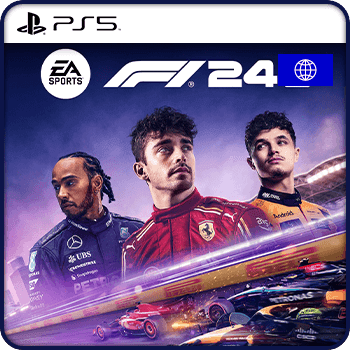

EA Sports F1 Global
Activation
Can be activated in United States
Product Region
Global
Platform
PlayStation
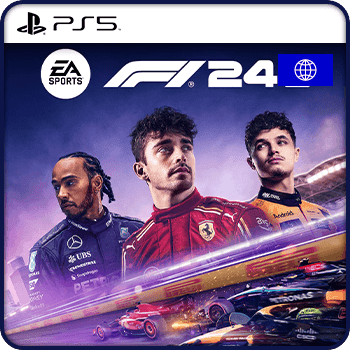 EA Sports F1
Product Summary
Please select a product
USD $38.33
Product Description
A new season is about to start, the sprint weekends are stacked, and your PlayStation 5 is sitting idle while friends are already racing. EA Sports F1 puts the full grid, licensed circuits and a career mode that rewards patience onto your console, and a digital key is the quickest way there. Instead of waiting for a disc to ship or a shop to open, players around the world can order a code and start downloading the same evening. That global availability is part of the reason this PS5 game key has become one of the steadier sellers in the game category.
If you have been putting off the decision to buy EA Sports F1 Gift Card, the whole process is shorter than a qualifying lap. Ordering happens online, the code lands in your inbox, and the PlayStation Store handles the installation. Buyers across the globe can pay with a familiar method and redeem within minutes of the confirmation email arriving.
This listing is a PlayStation 5 game key rather than a disc, so nothing is posted and nothing can be lost in transit. EA Sports, working with Codemasters, builds the series around the official race calendar, licensed teams and circuits, and a handling model that shifts with track temperature. The key redeems through the PlayStation Store, which means the game attaches to your PlayStation Network account and appears in your library next to everything else you own. It is intended for accounts that match the store region shown with the listing, so confirm that detail before you pay.
Three situations come up most often. A friend finally buys a PS5 and wants a racing title two people can play on the same screen, so a key is sent as a gift and redeemed the same evening. Someone who prefers a local payment method would rather not enter card details into a console storefront and still wants the game during release week. And a long-time fan wants the digital version sitting on the console instead of a disc case on a shelf. None of these require a trip to a mall.
Orders are handled with instant digital delivery: the key is released as soon as payment clears and emailed to the address on the order, usually within a few minutes. There are no hidden fees added at the final step, so the total on the basket page is the total charged. If the email does not appear, check the spam folder first, then send the order number to support and the team will resend it.
Every key sold here is obtained through authorised distribution channels and checked before it reaches a customer, and codes that have already been redeemed are filtered out during that check. The ordering flow confirms the product, the region and the email address before payment is captured, which prevents most mistakes from happening at all. If something does go wrong, support reviews the order within 24 hours, asks for a screenshot of the error, and either replaces the key or refunds it.
Stock for this title moves fastest around race weekends and new season launches, so the listing is replenished regularly rather than held back. Order your key now and it will be sitting in your inbox before the next session begins.
- The key works on any PlayStation 5 console signed into a PlayStation Network account that matches the listing region.
- It can be sent as a gift to a friend who owns their own console and account.
- Nothing beyond the game key is needed to start racing, since the download comes straight from the PlayStation Store.
- There is no disc to scratch or lose, and the game can be installed again on the same account later.
- Buying a key means card details never have to be entered into a console storefront.
- Redemption takes under a minute through the PlayStation Store redeem page.
- No expiry date is published for the code, so it can be held until you are ready to play.
- It is a single one-off payment with no subscription or recurring charge attached.
- Local split-screen racing works without a PlayStation Plus membership.
Buying a digital key should take less time than installing the game, and that is the standard Fleximart works to. Orders are processed automatically, codes are checked against the distributor before they leave, and the checkout is kept short. Players come back because the process behaves predictably and support answers when something goes wrong.
Codes are released within seconds of payment
Payment confirmation triggers the code release automatically, which is why most orders are finished before a customer has refreshed their inbox twice. Nothing sits in a manual queue unless the payment itself is flagged for review.
Card details never touch the store's own servers
Checkout runs through a payment gateway that encrypts the transaction end to end, and card numbers are not held after processing. That is the practical reason a purchase can be completed on a phone without a second thought.
The price at checkout is the price charged
Nothing is added afterwards for processing, delivery or currency conversion, and the figure on the basket page is the figure on the receipt. Buyers comparing totals across listings usually find this store sits level with or below the same title elsewhere.
Processing is built for digital orders
With no physical stock to pick or ship, an order travels from basket to inbox without a warehouse step. That structure is what makes instant delivery possible at two in the morning as easily as at noon.
Pricing is reviewed rather than set once
Rates are checked against the current PlayStation Store figure and other key sellers, then adjusted instead of left to drift. That habit is how the best price on a popular new release tends to hold here without a coupon code.
Checkout takes three screens
Pick the key, confirm the email address, pay. There is no long registration form to complete before the payment page loads, and the confirmation arrives with the code inside it.
Every code is verified before delivery
Keys are checked against distributor records for validity and are not sent if they have already been used. Duplicate deliveries are caught before the email leaves, not after a customer complains.
Sourcing is documented, not vague
Keys come from authorised distributors and regional publishing partners, and the source is recorded against each batch. If a buyer asks where a code originated, support can answer with specifics.
Support handles real problems with real steps
If a key fails, the first reply asks for the order number and a screenshot, then the redemption status gets checked. Replacements and refunds are handled by the same people reading the message, so there is no ticket loop.
Terms And Conditions
- Region restriction: this key is tied to the store region shown on the listing. Redeem it on a PlayStation Network account registered in a matching country, otherwise the PlayStation Store will reject the code.
- Digital delivery only: nothing is shipped. The code is delivered by email to the address entered at checkout, and no physical card or disc exists for this order.
- Refund policy: digital goods are non-refundable once the code has been revealed or delivered. Report a faulty key before redeeming it so the order can be reviewed.
- No cash value: the code cannot be exchanged for cash, transferred as credit, or resold as a wallet balance.
- Account compatibility: a PlayStation 5 console and a valid PlayStation Network account are required. The buyer is responsible for confirming compatibility before purchase.
- Correct entry: the buyer is responsible for entering the code accurately and for keeping the order confirmation email until the download completes.
- Expiry: no expiry date is published for this code at the time of listing, though redeeming it promptly is recommended.
This summary is for informational purposes only and does not constitute legal advice. Buyers should refer to the official PlayStation terms of service for full terms.
How to Redeem
The redemption flow is easy to use even on a first purchase, and the steps below take about a minute from start to finish.
- Sign in to the PlayStation Network account you actually play on, on your PlayStation 5 console or through a browser.
- Check that the account's country matches the store region noted on this listing before you continue.
- Open the official redeem page: https://store.playstation.com/redeem
- Enter the code exactly as it appears in your order email, including any hyphens and capital letters.
- Confirm the title shown on screen is EA Sports F1, then select Redeem to attach it to your account.
- On a PlayStation 5 console you can use the same flow from PlayStation Store, then the menu option for redeeming a code.
- Go to your game library and start the download, then keep the order email until the installation finishes.
- If the store returns an error, take a screenshot and send it with your order number so the team can check the redemption status.
Frequently Asked Questions about EA Sports F1
These are the questions buyers ask most often about this PlayStation 5 game key, answered briefly and without the sales pitch.
A game key for EA Sports F1 can be ordered from Fleximart without leaving home. Choose the PS5 key on the category page, complete checkout, and the code is emailed to you. There is no physical store visit and no waiting for a courier.
Orders placed here run through encrypted checkout, and every code on this platform is sourced from authorised distributors and checked before it is sent. If a key fails to redeem, support reviews the order, asks for a screenshot and replaces or refunds it after verification.
Yes, you can purchase EA Sports F1 Global with a debit card. Add the key to your basket, go to checkout, enter your card details on the secure payment page, and confirm. The order processes straight away and the code follows by email once payment clears.
No. The code does not carry an expiry date, so you can hold it until you are ready to redeem it on your PlayStation 5.
Codes issued for this listing are tied to the store region stated at checkout, so redeeming on an account registered elsewhere often fails. Confirm your PlayStation Network region before you order.
Codes are usually emailed within a few minutes of a cleared payment. Delays only happen when a payment review is triggered, and support can confirm the status.
Yes. Use the recipient's email at checkout or forward the code once it arrives. Keys are not locked to a name, so the person who redeems it first gets the game. Just make sure their PlayStation account region matches the listing.
Contact support with your order number and a screenshot of the error. Codes are usually rejected because of a typo or a region mismatch, and both are fixable. If the key itself is invalid, the order is replaced or refunded after review.
PlayStation Store normally allows several wallet codes to be redeemed in sequence, and the value stacks on the same account. This particular key is a game code rather than wallet credit, so redeem it on its own and keep other codes for later purchases.
Yes, provided the region matches. Sign in with the account you actually play on, open the redeem page, and enter the code. If your account was registered in a different country from the key's region, the store will refuse it.
This is a game key, not wallet credit, so it unlocks EA Sports F1 on PlayStation 5 rather than funding other purchases. Once redeemed, the game sits in your library and can be downloaded again on the same account whenever you reinstall.
Buyers looking for cheap PS5 game credit in larger amounts can contact support before ordering to ask about bulk options. Pricing depends on the title and the quantity requested, and any arrangement is confirmed in writing before payment.
Redeem pages usually reject a mistyped code without consuming it, so re-enter the characters carefully after checking for similar letters and digits. If the store says the code is already used, contact support with your order number so the redemption history can be checked.
No. The game runs without a PlayStation Plus subscription for single-player and local split-screen racing. Multiplayer races and some community features do need an active subscription, so check the PlayStation Store listing for the current requirements.
